Insights

The Top 3 Requirements that are Met by Dedicated Servers

Submitted by HostingUltraso.com on

Dedicated servers are the best hosting solution if your business website is large in size. Numerous features make such servers the right choice for business.
When your company starts developing a website, various things have to be remembered. One of the foremost queries is what type of website hosting does your business need? If you want to meet the maximum demands of your online clients, you must know that a website host that offers a dedicated server in Germany, London, India, or other places is the correct choice. If you use the best-dedicated server, your organization will have complete control of the whole hard drive that is used by your site. That indicates that you may utilize devices & configurations that your staff is already familiar with when you load & manage your website.
1. Provides Advantages to Businesses
Various business causes make the renting of dedicated servers for website hosting necessary. You voluntarily attain an advanced level of safety control for your website, as the servers are not shared with anybody else. Moreover, you dont have to think about using software or an OS that different organizations are using. You are required to fix the server according to your specifications & arrange it in a manner that makes sense to you & your staff. So, even if you are managing a business from Germany, having a Germany dedicated server is all you need to maintain efficiency.

Steps to get started with Germany dedicated server setup and configuration
2. Configuration Requirements
There are many things to know when it comes to the configuration of a dedicated server. This means that you must understand the precise requirements for the configuration of a dedicated server in France & other places as applicable. Some of these requirements are:
The Server Administration
The Operating System
Future-proofing and Scalability
Data Center
The Web Server
Pace and Performance
High Bandwidth and Faster Data Transport
Database Applications
3. Technical Requirements
It is useful to know that there are two different methods to purchase dedicated servers through a web hosting solution. The first method is a dedicated hosting package with which your organization is accountable for every software specification & modification that occurs on your website. It is a wise decision to have someone who is an expert in website apps & can keep track of the online web servers for you. Alternatively, managed servers utilize huge help from the web hosting solution. You may employ their software applications & they would ensure your server is configured correctly. Then they would offer test administration arrangements so that you can make changes & execute daily site management activities.
On expanding the additional amount to get the dedicated server in Poland or elsewhere, you should assume the website host to be both dependable & feasible. Most reliable dedicated servers have a very small problem with downtime, as the resources are mainly dedicated only to their functioning. In other words, Poland or other location dedicated servers are not shared with anyone else, and it is used for an individual purpose.
Customer communication and support services for dedicated server management

What Are The Features Of A Dedicated Server That Can Suit My Needs?
High-security Aspects: The users will definitely benefit from exceptional standards of security that can effectively cater to compliance & data protection requirements. A trusted dedicated server provider will make sure that the security audit is the priority feature of their hosting services & also includes provisioning of malware & anti-virus scans, spam filtering, security enhancements & physical security. So even if you use a dedicated server hosting solution in France or any other location, you can still expect the same level of security.
Dedicated Support: It consists of support to frameworks by implementing eAccelerator management, PHP upgrades, recompilation of the Apache Server and much more. You can enjoy dedicated support from any part of the world, be it from Germany or the UK.
Dependable Hosting Infrastructure: Using managed dedicated servers allows you to depend on the hosting infrastructure. The reason is that the data centers are strategically located so that your web applications can be consistently available without disruption due to natural disasters.

Poland Dedicated server with 24x7 technical support and monitoring services

High Maintenance: Users of managed dedicated servers are assured of excellent maintenance support by proven service providers. This is for Poland dedicated server or any business location dedicated server. They can be depended upon for immediate resolution of technical glitches, analysis of log files, app updates & many more.
Facilitation of Growth: With managed dedicated servers, the procurement of additional resources to meet the demands of higher traffic becomes easier. These servers are easily scalable & backed by a dedicated official who looks after the distribution of a broad spectrum of resources that include servers, bandwidth & storage. Assured scalability enables the growth of your business without any stress on the resources.
Summary
Being aware of the considerations that are required for a dedicated server will help you make the best choice for your enterprise or organization. A dedicated server is surely the right choice if you want to manage high traffic on your website & also draw many customers to your site. It benefits your business rapidly, as you dont have to worry about the operating system or software that the other websites are using. You have total control to adjust your dedicated server specifications, considering your business needs. It is also discussed above that a dedicated server requires some specific configuration requirements like server administration, an operating system, web server, data center, higher bandwidth, and database applications.
CTA

Purchase our dedicated servers to grow your online business, and at the same time, ensuring your online data security. Send an email to sales@hostingultraso.com to order your required dedicated server today.

Top 8 Factors to Consider Before Buying Any Dedicated Server

Submitted by HostingUltraso.com on

There are many kinds of servers in the market to satisfy your business needs. Among those servers, a dedicated server is beneficial for you. As a businessman, you must know the factors that define a reliable & trusted dedicated server.
In the technologically advanced age, servers play a crucial role in the world of the internet. Also, if anyone is planning to create a website for their business, choosing a suitable hosting server is of utmost necessity, so that your target users can access your website easily. A hosting server can save your time & money effectively. There are many kinds of servers like shared hosting, dedicated server hosting, virtual private hosting & many more. A dedicated server is the best for you, as you have full control over your server settings. But selecting the right dedicated hosting server may be an overwhelming task. Before taking a final decision, you have to think it over twice so that there are no negative consequences in the future.
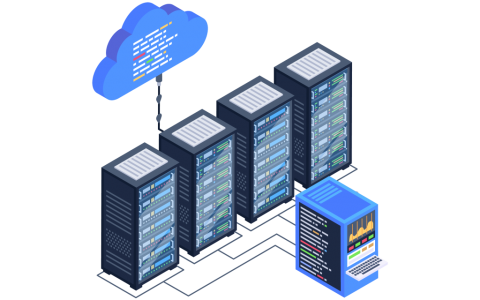
Modern data center server room supporting dedicated server hosting

Factors Before Considering Purchasing a Dedicated Server
Let us look into some of the factors to be remembered before you choose a particular dedicated server:
Operating System: If you incline to an open-source system, you must select a Linux server. Open source system uses software like PHP, Apache, MySQL, or Ruby on Rails. Hosting on ASP.NET cipher, MS SQL server or using Microsoft IIS would require you to choose a Microsoft Windows dedicated server.
RAM: Whether you require a dedicated server in France or a dedicated server in Canada, always check whether the dedicated server will be able to provide you with sufficient RAM or not. High storage capacity is essential for data storage purposes; all your official data is stored in your server safely & you dont need to worry about running out of storage every time you store data. Power ravenous technique stacks such as Windows, Java, or Ruby would need a server with abundant RAM.
Bandwidth & Performance: Applications such as game or chat servers may need multi-processor servers like an Xeon server. Moreover, if you aim to host multimedia, pictures & others, select a dedicated server provider with excellent pace & performance. Your software reliability and speed are related to the quantity of internet bandwidth you have. A California dedicated server or any dedicated server ensures that your website doesnt get overloaded with web traffic. This improves your web performance as you dont have to share your bandwidth with other websites.

Best bandwidth plan for a Canada dedicated server to handle high traffic needs
Managed Servers: It is advisable to select a managed server rather than an unmanaged server, especially if you do not need the proficiency of a system manager. By doing so, you can concentrate more on your organization. Besides, managed dedicated servers come with their own advantages. These include lowering of operating costs, no need for extra support staff, expertise & security, server monitoring, all-time support & last but not least, availability of backup option. This is applicable whether you use a California dedicated server or any of your preferred locations dedicated servers.
Business Needs: Your business is your primary concern, a priority when it comes to choosing the right dedicated server. First & foremost, understand your business needs, whether your company is a startup, a small organization or e-commerce. Then consider the other factors like disaster recuperation, administration of big files, PCI compliance, security, high accessibility & other services.
Cost: Servers of any type are undoubtedly expensive. But look for a server type that will provide maximum benefits at a fair price. It is an intelligent choice to go for a server that is expensive, but it is worth it for all the functionalities it comes with. In this case, a dedicated server is definitely the best option. But still, it is advisable to consider a few factors related to cost when choosing a dedicated server. These are: whether tax is involved or not in the monthly cost, the software licensing charges, the cost of upgrades & components, scalability & the downtime charges.

Cheapest California dedicated server hosts offering low-priced hosting solutions
Support: Any reputed dedicated server provider will offer you the advantage of having a 24*7*365 customer support option. Any user can contact the server providers to solve any queries or complaints about the service. So, check whether your dedicated server provider has this facility or not.
Control Panel: Often, various server hosting providers provide their individual control panel. It is wiser to select a dedicated server provider that has an accepted panel like cPanel, Plesk or WHM so that your sites would not face any security and efficiency issues. The graphical user interface of the control panel makes it easier for you to manage your dedicated server functions without much technical knowledge. Whether you buy a Canada dedicated server or any location dedicated server, you must check the presence of this feature.

Expert server technician checking a dedicated server component
Summary
Thus, it is important to have these points in mind when you are planning to purchase a dedicated server in California, Italy or India. At first, it is discussed that you have to decide on your operating system before purchasing your dedicated server. Linux is the ideal choice if you opt for an open-source operating system and Windows is best if you choose closed source. Then, it is written that you should check whether your dedicated server could provide sufficient RAM for storing your official data. Then, you should buy a dedicated server with higher bandwidth to ensure higher uptime and the best website performance during users website visits. Also, the importance of managed dedicated servers is analyzed, as there would be lower operating costs and fewer needs for support staff. Another factor that you must consider is your business needs and the business time. You must also see your budget and try to buy a dedicated server that provides the highest benefits. Our technical support team is present 24*7*365 if you face any technical glitches in your dedicated server. At last, it is evaluated that you must choose a dedicated server that has control panels like cPanel or Plesk. This is to allow you to adjust your server settings whenever your business requirements change.
CTA
Remove all confusion on whether to purchase a dedicated server for your business by sending us an email at sales@hostingultraso.com.

The Features And Benefits of Using a Dedicated Server

Submitted by HostingUltraso.com on

What Is a Dedicated Server?
A dedicated server is a physical computer that is hosted in a data centre and connected to the internet. The physical server is assigned totally to a user, company or application that provides total control over the server resources and configuration. This includes the server CPU, Storage, RAM and Bandwidth. You have the independence to choose the software as per your requirements. A Tirana dedicated server or any location dedicated server provides you with the option to customize your server environment and configure your security settings.

What is a San Francisco dedicated server is and how it works
Features of a Dedicated Server
A dedicated server hosting plan is way better than some other hosting plans. There are some crucial technical features available with a dedicated server hosting plan, and these feature makes the server beneficial as well.
The effective features of a dedicated server are:

  • Multiple resources and choices for OS installation
  • 24x7x365 technical support
  • Fully customized cPanel option
  • Choices for hardware
  • High-level security
  • Maintenance support
  • Flexibility and scalability

These are some fantastic features that make a dedicated server hosting a beneficial one.
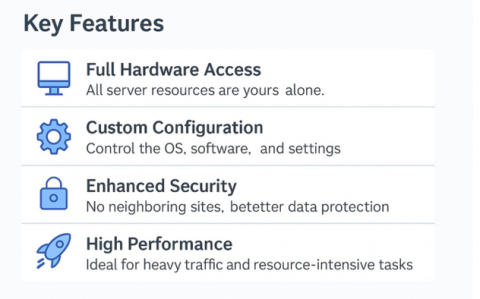
Multiple Resources and Choices for OS Installation: The dedicated server hosting plan comes with huge numbers of resources, and those are solely dedicated to you. This is applicable for San Francisco dedicated server or any dedicated server. The software, hardware resources are those essential factors of a server configuration that, if shared, then sometimes cause worries, but in dedicated hosting, all these things are dedicated and therefore depend upon your business criteria or hosting plan. You can control these things yourself or via the technical team. You have all the authority to manage your resources.
24x7x365 Technical Support: The technical team is there to support you whenever you need it. You are paying money for the technical support and therefore, you will have a better support team available 24 hours.

features and benefits of using a dedicated server
Fully Customized cPanel Option: There will be a Control Panel loaded with different software that can be fully customized. You can control and manage the software and cPanel functionalities.
Choices for Hardware: There will be a number of hardware options as well, and those will be dedicated to you as you wish to have them, depending on the criteria of your website. For example, processors, storage and RAM of various capacities.
High-Level Security: There is some security software that will take care of your Berlin dedicated server or any dedicated server protection. The continual monitoring system can give you the desired level of security to ensure that no threat is active there to harm your server.
Maintenance Support: The Mexico City dedicated server or any dedicated server will be maintained properly by the technical team and continuous monitoring of the server will be done to ensure the performance, and if any issues occur, then there will be backup support as well.

Key features of Tirana dedicated server including hardware access and security
Flexibility and Scalability: There is huge flexibility available for your dedicated server hosting plan and it is scalable too. Scaling up and scaling down for server configuration is one of the important things and this facility also ensures the flexibility feature of your server configuration.
Benefits of a Dedicated Server
The benefits of a dedicated server are the following:

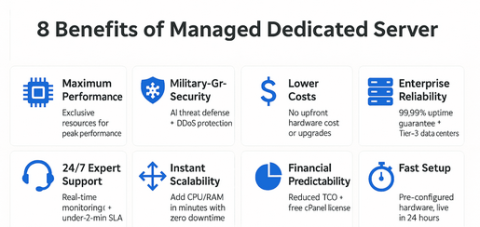
Enhanced Security: It provides you with security for your online business data. The reason is that you can decide which operating system to use, the applications to install and who to give admin-level access.

Complete Control: You can select your hardware and software settings, considering your specific business needs. This assists you in optimizing your system performance and carrying out your daily business operations faster.

Scalability: As your business expands, you can increase the upgradation of your dedicated server resources by adjusting your system requirements. There is an option of adding more RAM space or CPU power to manage your daily workloads without compromising on speed. This is applicable irrespective of your business location. For example, if your business is based in Utah, you can purchase a Utah dedicated server.

Reliability: It also ensures that you obtain constant reliability as all hardware and software resources are particularly dedicated to your business needs. This makes it perfect for handling higher website traffic. It also helps in the smooth running of resource-heavy web applications without disruptions for your users.

Eight benefits of managed Utah dedicated server including security and performance

Dedicated IP Address: A dedicated server provides you with a dedicated IP address for your business. Here, no one else will have any access to your server except you. It prevents CAPTCHA and VPN blocks and also prevents blacklisting risks due to actions of the other users in the same IP.

No Maintenance Cost: If you need a dedicated server but dont have time, money and human resources to maintain it, then the managed dedicated server is best for you. The maintenance cost is included in the overall service charge and there are no hidden costs.
Higher Uptime Guarantee: A Utah dedicated server or any dedicated server provides a 99.99% uptime guarantee for your business. It keeps your business website operational 99.99% of the time, thus preventing reputation loss and also increasing revenues.

Summary

In this blog, the definition of a dedicated server and its features and benefits are discussed. It is seen that a dedicated server is assigned to a specific user, organization or business application. This provides total control over your server resources and configuration. Then the features of a dedicated server are written. Some key features identified are multiple resources and choices for Operating System installation, enhanced security, fully customized CPanel, maintenance support and 24/7 technical support. You have the independence to choose your preferred operating system while using a dedicated server. Also, there is a control panel that enables you to adjust your hardware and software configurations as per your needs. You will also obtain 24 X 7 X 365 technical support if you face any issues regarding your dedicated server.
Also, the benefits of using a dedicated server are briefly explained. It helps in your data security by giving you the option on whom to give your system admin access or which application to install. It is further written that the dedicated server helps in optimizing your system performance by adjusting your hardware and software settings. You can also increase RAM or storage space to handle your daily website traffic. It is helpful for you to expand your business worldwide. At last, the low dedicated server installation and maintenance costs provide a budget-friendly option for your business.

CTA
If you want to secure your critical organizational information from DDoS and other kinds of cyber attacks, email us at sales@hostingultraso.com.

Distinction between Dedicated server and VPS hosting

Submitted by HostingUltraso.com on

What Is a Dedicated Server?
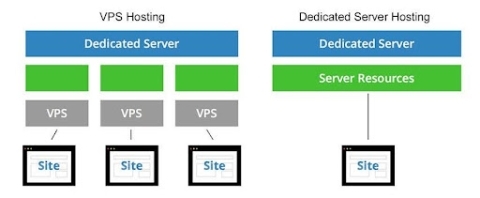
A dedicated server is a physical server that is leased to a single business owner or user. It provides exclusive access to all its resources, including storage, processing power and memory. Unlike virtual private servers, where resources are shared, a dedicated server provides the highest control over hardware and software resources. It provides a higher level of data security since there is a lower risk of threats from other users. You can adjust your server operating system and software settings to meet your organization specific needs.

IT engineer managing enterprise server infrastructure in a data center
What Is VPS Hosting?
Virtual Proxy Server(VPS) Hosting provides a virtual server environment within a physical server. It offers dedicated hardware and software resources and greater control over them than shared hosting. It is provided at a lower cost than a dedicated server. Each VPS has its hardware and software resources, including RAM, Storage and CPU. It provides a balance between the cost of shared hosting and control of a dedicated server. This provides the best option for websites that have exceeded shared hosting but dont require a full dedicated server.

VPS hosting services with virtualized infrastructure and scalable resources

Differences between Dedicated Server and VPS Hosting
The differences between the Dedicated Server and the VPS hosting are as follows:

1. As the term, Dedicated states, the server is entirely dedicated to you, which means all the resources and OS, services, like everything are dedicated to you based upon your customization requirements. On the other hand, the VPS hosting or Virtual Private Server is a part of the big server which is virtually dedicated to you as if you have your dedicated server, but unlike a dedicated server, everything is not fully dedicated based on your custom requirements.

2 . There is a huge difference in the price factors for both servers. A dedicated server is more costly than a VPS. This is applicable for an Ohio dedicated server or any location's dedicated server.

3 . Through a Texas dedicated server or any location's dedicated server, you can have the facility of having unlimited bandwidth, but a VPS comes with a limited bandwidth facility. This means if you are sending heavy files consisting of pictures, videos, and many things together, then it becomes troublesome for you.

4. Dedicated hosting is always convenient for geo processing as it is equipped with a powerful processor that can facilitate your performance in a better way. In the case of VPS hosting, the processor will not be as good as you would require.

5. VPS limits you to a few resources. But a Dedicated server comes with huge numbers of resources that will be beneficial for your business. For example, a Sydney dedicated server or any location's dedicated server.

6. You get 100% server access to the settings and all resources but in the case of VPS, you will not have full access even to those few resources.

7. A dedicated server comes with very high security and even customization required on security-based software that will be available for you. But in the case of VPS hosting the security is lesser than that Dedicated one.

8. Through managed dedicated servers, you can have lots of facilities and services. The full technical team will be there for you for any time help, whether for Maryland dedicated server or any location. But, VPS hosting is unmanaged and therefore, you have to be technically proficient to deal with different issues.

9. For a complicated business, an application-based website needs good resources and a technically strong back-end system. Therefore, that business should need a dedicated server. But if your business is simple in terms of applications and you dont need to waste time to go for all the technicalities that you are not aware of, then your site needs VPS hosting.

VPS hosting vs dedicated server in Ohio architecture showing resource allocation
Summary
In this blog, the differences between a dedicated server and VPS hosting are discussed. First of all, the definition of a dedicated server is written. Also, the VPS hosting is defined. Then, the differences between dedicated hosting and VPS hosting are written. First of all, it is discussed that the resources of a dedicated server are entirely dedicated to a single user. However, in the case of a virtual proxy server, all resources are not dedicated to a single owner. Then, a dedicated server is more costly than a virtual proxy server. Also, a dedicated server has an unlimited bandwidth facility, whereas a virtual proxy server has a limited bandwidth facility. It is also written that VPS comes with fewer resources but a dedicated server provides multiple resources that would be beneficial for your company. A dedicated server has greater security features than VPS hosting. It is also seen that a dedicated server is managed, which means the technical team will be available anytime. But, VPS is unmanaged, thus leading to complications in managing its technical aspects. At last, it is written that for running a complicated business application, a dedicated server is essential as it requires higher resources and an expert technical team for maintenance. But VPS Hosting is only beneficial for running a simple business application.

CTA
If your business applications require a large quantity of resources, contact us at sales@hostingultraso.com to choose your preferred dedicated server. We also have an expert 24/7/365 technical team for maintaining your dedicated server.

Why Unmetered Bandwidth Matters for Your Dedicated Server?

Submitted by HostingUltraso.com on

Unmetered bandwidth gives you bandwidth without limits.

It unleashes the freedom to host your website without any limits or restrictions. And you get speed beyond your imagination.

This makes your experience with hosting your company website easy and smooth.

Now, if you run your website on a dedicated server, this type of bandwidth gives you the best server experience.

This also helps you with seamless gaming and streaming. So, if youre into that, the world is in your hands.

You get dedicated servers with unmetered bandwidth in any latest plans. And you witness an innovative server experience with that.

Unmetered bandwidth dedicated server for unlimited data transfer

So, why unmetered dedicated server matter? ” is this blog main discussion subject.

This blog provides you with a detailed analysis of that subject. This will help you understand why an unlimited bandwidth server is now essential for your website growth.

This blog will discuss the following:

What Web Hosting Is

What Dedicated Server Is

The Use of Bandwidth in a Dedicated Server

What Unmetered Bandwidth Is

The Use of Unmetered Bandwidth

Why You Need Unmetered Bandwidth for Your Dedicated Server

So, let start!

What is Web Hosting?

Before learning about unmetered bandwidth, it important to know about web hosting.

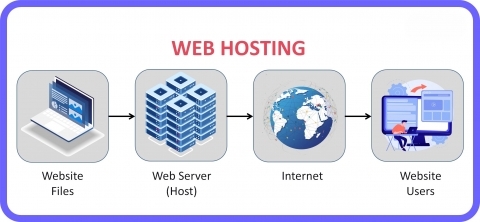
Web hosting is the reason your company website can access the internet. Hosting providers store and then deliver your website by providing space on their servers. Web hosting helps store your website files like HTML, CSS, images, and videos. It also gives you a domain name to allow the users to access your website. Your website gets 24/7 access with the lowest downtime. You also get important security features like firewalls, SSL certificates, and backups for better data protection.

What is web hosting and how servers host websites

This is how web hosting ensures speed, reliability, and security for your website.

There are some common types of web hosting, and they are:

  1. Shared Hosting
  2. Virtual Private Server (VPS) Hosting
  3. Dedicated Server Hosting
  4. Cloud Hosting
  5. Managed Hosting
  6. Colocation

What is a Dedicated Server?

A dedicated server is one of the most important web hosting solutions. It is also the most viable option among other web hosting types. And there are reasons for that.

You or your company gets a whole server so that you can host your website. You also get every server resource with that. This also helps you get full access to all the hardware on the server. CPU, RAM, storage, and bandwidth are some of its important hardware. This gives you the best performance, customization options, and total control with that.

What is a dedicated server and how it works

A dedicated server also comes with some of the most unique web hosting features. These features keep its web hosting service miles ahead of others. It provides you with top-tier security with optimal server performance. You can also get to customize your server software and hardware configurations. That simplifies managing massive workloads based on your needs. You also get an assured 99.9% uptime or more for your website. Unlike other web hosting types, no one else can share your dedicated server. This fulfills the full control aspect of your dedicated server. This also makes a difference from other web hosting services like VPS, cloud, or shared hosting.

These qualities equip a dedicated server with the best web hosting facilities. You get boundless freedom with your dedicated server when it comes to hosting your website.

What is Bandwidth in a Dedicated Server?

Bandwidth in a dedicated server is the amount of transferred data. This data transfer happens between the dedicated server and the visitors over the internet. It is the capacity of the connection that a dedicated server uses to connect with the outside world. You can measure that through data per month (like, TB per month) or speed (like Mbps or Gbps).

Bandwidth performance and data transfer in a dedicated server

The bandwidth in a dedicated server comes in two ways:

  1. Bandwidth Quota per Month: Most hosting providers provide you with dedicated servers with a set amount of bandwidth. This fixed amount of bandwidth happens per month, like 10 TB or 100 TB. So, you get penalties if your dedicated server crosses the data limit. You might have to give extra charges for using over the assigned data limit. Or, the hosting providers may slow or cut the connection.
  2. Unmetered Bandwidth: Some dedicated server plans offer you unmetered bandwidth. This feature puts no cap on the amount of transferred data. But your dedicated server network connection speed can limit the actual transfer rate.

You can also measure the bandwidth for your dedicated server. Two aspects work in a dedicated server that measure its bandwidth:

  1. Data Transfer: It takes all data sent from the server to your users and uploads to the server. In general, the bandwidth measurement happens on a per-month basis, like 10 TB/month.
  2. Network Speed: Here, the total amount of transferred data depends on the connection speed per unit of time. For example, a 1 Gbps connection is the maximum transfer rate of 1 gigabit (Gb) per second.

What is Unmetered Bandwidth?

Unmetered bandwidth is the type of bandwidth without any particular data transfer limit. This does not track the total amount of data transferred. Instead, you can use as much bandwidth as your dedicated server needs. It means it stays within the limits of your dedicated server allocated network speed, like 100 Mbps, 1 Gbps, or 10 Gbps.

What is unmetered bandwidth in a dedicated server environment

There are some key features of a dedicated server with unmetered bandwidth:

  1. No Data Transfer Caps: This bandwidth does not have any predefined data limit. It different from the data limit per month usage. This makes you transfer as much data as you need from your dedicated server.
  2. Limited to Network Speed: Your dedicated server connection speed determines the total amount of data transferred. Still, it gives you more bandwidth resources than the per-month data quota.
  3. Fair Use Policy: Many hosting providers apply œfair use policies with unmetered dedicated servers. This makes your dedicated server not use up its resources in an excessive amount. That is because it might lead to data surcharge or overuse.

You need to have a specific plan before having an unlimited bandwidth server. This builds the correct infrastructure for this type of bandwidth.

Use of Unmetered Bandwidth

There are several uses of unmetered bandwidth in a dedicated server that make it very essential:

  1. Video Streaming: Platforms like live-streaming apps, video-on-demand sites, and OTT services can serve large audiences. To maintain such streaming sites, you need dedicated servers without bandwidth limits.
  2. Gaming Servers: Multiplayer games and game streaming platforms need dedicated servers with low latency. This ensures smooth and seamless gaming experiences for the users. So, these servers need unmetered bandwidth environments.
  3. File Hosting and Sharing Services: Platforms providing file downloads or cloud storage need dedicated servers with unmetered bandwidth. This simplifies consistent and large-scale data transfer in the file servers.
  4. High-Traffic Websites: Social networking sites or news websites have millions of daily visitors. So, it gives huge traffic to those websites on a day-to-day basis. That why these websites need unmetered bandwidth servers.
  5. Data Backups and Transfers: This type of bandwidth helps some dedicated servers used for copying or backing up huge amounts of data between locations.
  6. SaaS Applications: It also helps web-based software with huge user bases that need huge amounts of data transfers. This helps experience spikes in traffic in those applications.

Why Need Unmetered Bandwidth for Your Dedicated Server

You need unmetered bandwidth for your dedicated server for several reasons. Here are some of the important ones:

  1. No Data Transfer Limits: This bandwidth gives you no restrictions on the data usage that your dedicated server can transfer. Your dedicated server can handle any volume of traffic without any data cap issues. It also avoids the risk of downtime or throttled speeds. It because it doesnt exceed the bandwidth limits. So, this provides consistency in your server performance with uninterrupted service.
  2. Scalability: This type of bandwidth is perfect for growing businesses and high-traffic applications. It can manage sudden surges in visitors during promotions, events, or viral moments. It also supports increasing traffic and that doesnt take any hosting upgrades often.
  3. Cost Management: Metered bandwidth can have pricey overage charges after exceeding the bandwidth limit. But this isnt the case with unmetered bandwidth servers. It doesnt take any surprise fees for unexpected traffic or data usage. Also, you pay for the connection speed only, not the usage volume. So, it offers a simple cost management for your dedicated server.
    Why unmetered bandwidth matters for high-traffic dedicated servers
  4. Consistent Operation: It is very helpful for services in your dedicated servers that need constant uptime and availability. High data transfer ensures smooth user experiences in the busy shopping seasons in e-commerce platforms. It provides continuous data exchange between your servers and users in SaaS applications. It also helps replicate large-scale data through backup and disaster recovery.
  5. Smooth Performance: It ensures your dedicated server delivers content and services without any inconsistency. So, it doesnt throttle the network speed due to bandwidth overuse. Nor does it cause any downtime if you exceed data limits.
  6. Competitive Advantage: This bandwidth ensures faster response times and greater customer satisfaction. It can provide opportunities to serve more users at once. This helps your website or service uninterrupted user experiences with faster uptimes. This provides a competitive advantage to your company.
  7. Management Overhead Reduction: You need to check and manage usage to avoid overages in metered bandwidth plans. But unmetered dedicated servers ease that by removing the need to track data transfer limits.
  8. Future-proofing: In recent times, demand for higher-quality content has increased in user expectations. This is also one of the reasons for businesses to grow in the future. This also ensures the rise and demand in bandwidth needs. This bandwidth future-proofs your dedicated server to manage such demands. And it doesnt need any expensive upgrades.

Final Remarks

Unmetered bandwidth boosts the potential of your dedicated servers. And it does that by maximizing your server performance.

It provides your dedicated server flexibility and reliability in more ways than one.

It enables your dedicated server to manage large or unpredictable traffic volumes.

It also supports resource-intensive applications. It also delivers a superior user experience for your dedicated server.

In a nutshell, it makes your dedicated server advanced with the power and speed of the newest technology. That, in the end, prospers the growth of your business.

Hosting Ultraso is a leading name in providing world-class dedicated servers.

We have 119 data centers all around the world for you to choose from the best dedicated servers.

We also provide dedicated servers with unmetered bandwidth at affordable prices.

Take your business to the international level with our lightning-fast dedicated servers.

How RAID Can Save Your Data on Your Dedicated Server?

Submitted by HostingUltraso.com on

A dedicated server with RAID provides you with the best web hosting solution.

It keeps your data secure with its formidable system. That makes it the most efficient kind of web hosting solution. A server is essential to host your website. And, you can rely on a dedicated server for that.

Different resources build your company website. Different multimedia files comprise those resources. Images and videos are the most important among those multimedia files. It also comes with different files like CSS, HTML, and JavaScript. And, you know how essential those files are for your company website, too.

Now, a dedicated server gives you the maximum storage capacity. This storage capacity helps you to save, manage, and recover your data. A dedicated server ensures the safety and security of those data.

Still, you can lose your data in a dedicated server due to several reasons. That might be hardware failure, cyberattacks, or data breaches. And data loss can make a significant impact on your company website.

RAID can be of significant help in this case.

RAID storage configuration in a dedicated server

RAID system gives you an extra edge to manage your dedicated server the best. It improves your dedicated server system with its functions.

This blog will guide you on how RAID array can help your dedicated server from data loss. You will also figure out the best RAID level to keep your dedicated server storage safe.

This blog will guide you through the following:

What Dedicated Server Is

What RAID System Is

Types and Functions of RAID Levels

Software RAID & Hardware RAID

Why You Need RAID for Your Dedicated Server

Let get into the main discussion!

What Is a Dedicated Server?

A dedicated server serves as one of the major web hosting services. This gives you or your company an entire server to host your company website. This also provides you with all the server resources. Not only that, but you also get to have full access to every hardware of your server. These hardware are storage, bandwidth, CPU, and RAM. This also ensures peak performance, control, and customization.

Dedicated server racks inside an enterprise data center

You also get some of the best features with a dedicated server. These features make a dedicated server more advanced than other web hosting services. You get the best server performance with maximum security. This also helps you customize your server hardware and software settings. You can handle huge workloads to adjust your needs by configuring your dedicated server. This also gives you a guaranteed 99.9% or more uptime for your website. Full access means full control that you get with your dedicated server. That also means no other parties can use your dedicated server. That is not similar to other web hosting solutions like shared, VPS, or cloud hosting.

As you can see, you get the best facilities with a dedicated server. Your dedicated server gives you the utmost freedom to host your website.

What Is RAID?

RAID means Redundant Array of Independent or Inexpensive Disks. It works as a data storage virtualization technology. Through that, it combines many physical hard drives or SSDs into a single logical unit. This improves performance, data redundancy, or both in a dedicated server. This enhances reliability in its data storage. It allows you to add more drives. And that increases capacity in the computer systems with scalability. This helps your dedicated server to improve its performance.

RAID arrays build the RAID system. These RAID arrays distribute data across many disks. It duplicates your data from one hard drive to another. This is how it stores the data in your dedicated server. You also get data protection facilities along with that. But it does not work as a backup technology. Still, it enhances your server storage with its basic but essential functions.

Let take a look at how the RAID storage system functions in a dedicated server.

Functions of RAID

It works through three significant functions, and they are:

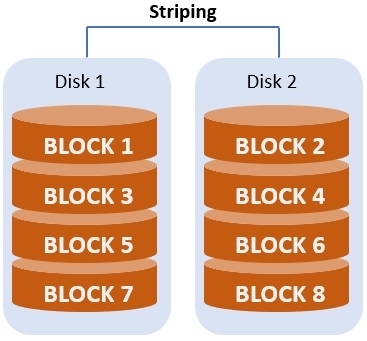
  1. Data Striping: This divides data into small blocks and spreads them across various drives.
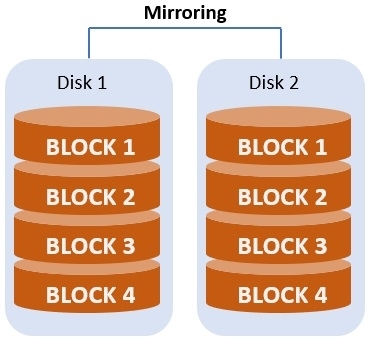
  2. Data Mirroring: It duplicates data across various drives to create redundancy. It also stops data loss when a drive fails.
  3. Parity: This rebuilds and restores data in case of drive failure. It simplifies redundancy with less storage overhead than full mirroring.

Types and Functions of RAID Levels

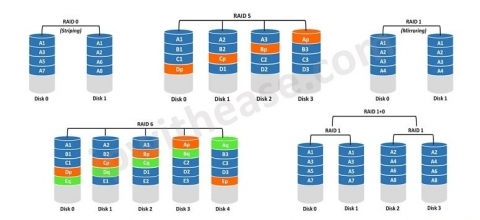
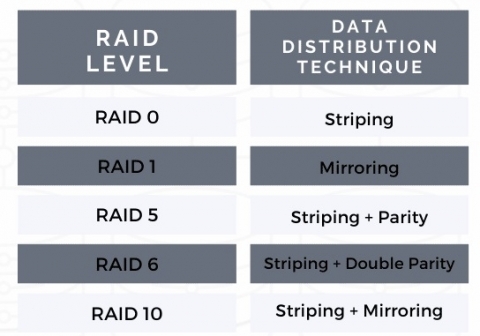
RAID levels are the different structures that make a RAID system. There are different types of RAID array levels in a dedicated server. But RAID 0, 1, 5, 6, and 10 (1+0) are the most common levels.

RAID levels explained for dedicated server storage performance

Here are the functions of those levels:

  1. RAID 0: It works through striping. It stripes the data across two or more drives. It gives your dedicated server high performance for read and write operations. But it does not provide redundancy. That means the disk loses all data in case of drive failure.
  2. RAID 1: It works through mirroring. It duplicates the data on two or more drives. It provides high fault tolerance to the disks. This means the data remains undamaged on the other drive even if one drive fails. But it does not provide a complete storage facility. For example, two 1TB drives can only give you a 1TB usable storage.
  3. RAID 5: It works through striping with parity. It stripes both data and parity information across three or more drives. Here, parity allows restoring the lost data in case of drive failure. It gives you a proper balance of performance, redundancy, and storage efficiency. But it takes long rebuild times if one drive fails.
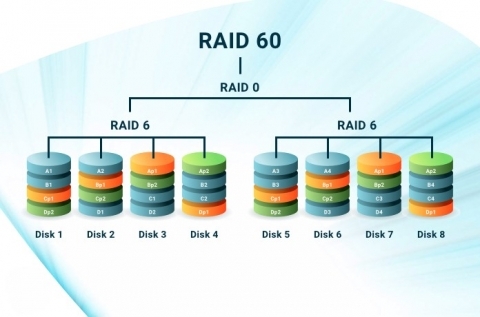
  4. RAID 6: It works through striping with double parity. So, it similar to RAID 5 but takes two sets of parity information. This allows up to two drives to fail without losing any data. This provides higher fault tolerance than RAID 5. But it needs more drives and has a higher parity calculation overhead.
  5. RAID 10 (1+0): This takes RAID 1 and RAID 0, and combines their functions, i.e. mirroring and striping. It stripes the data across pairs of mirrored drives. This, as a result, comes with superb performance and redundancy. But it is very expensive because it needs four drives, at least. Among those drives, only half of its total capacity is usable.

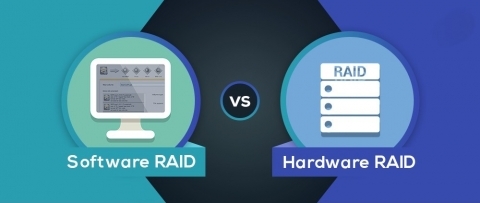
Software RAID and Hardware RAID

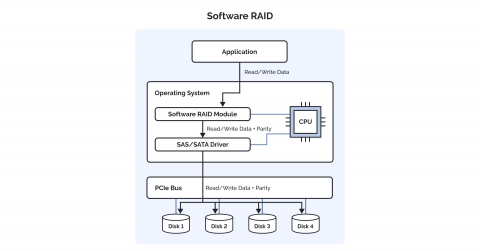
There are two types of RAID in practice. Those two RAID types are Software RAID and Hardware RAID. These two different RAID types implement RAID system. Here is a little overview of both these RAID systems:

Software RAID

Your dedicated server operating system manages this RAID storage system. It can also take specialized software to perform. It uses your server system CPU and memory to perform RAID functions.

It does not need any extra hardware or dedicated hardware RAID controllers to work. This makes it the most affordable option out there. But it can work across various types of hardware. It is also easy to configure because of the built-in tools in the operating system. Its RAID data storage setup is portable. It means that it allows moving the drives to another system with the same OS. You can maintain the RAID hard drive setup through that, too.

But it can reduce performance for other tasks because it uses the server system CPU and memory. It does not have many advanced features like hardware RAID. Its recovery is very complex because it uses the operating system of your dedicated server.

Software RAID vs hardware RAID in a dedicated server setup

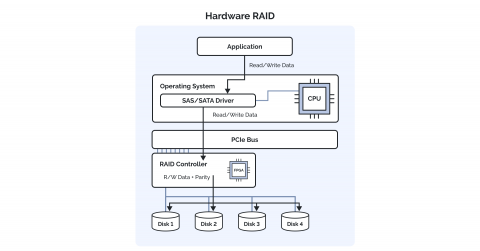
Hardware RAID

It uses a dedicated RAID controller that is a physical device. That how it manages RAID activities. These controllers are standalone cards. These cards come in installed in a dedicated server or built into its motherboard. That controller card or chip offloads the RAID storage functions without the operating system. It comes with a dedicated processing power for RAID system tasks that frees up system resources.

It provides faster server performance due to the controller. It also comes with battery-backed or flash-backed write caches. This protects your data during power failures. It replaces drives and rebuilds arrays in a faster and more reliable manner. It can also manage the boot drives. This allows your dedicated server system to boot straight from a RAID array.

But it very expensive because you have to buy a RAID controller. It depends on the hardware to configure, so its RAID setup is not portable. It has a complex initial setup. And data recovery gets more difficult in case of controller failure.

Why Need RAID for Your Dedicated Server

You need RAID for your dedicated server for the following reasons:

  1. Necessary Equipment: RAID system comes with the necessary arrangements to manage your dedicated server. A hardware RAID card or software RAID system takes control of the RAID array. This ensures smooth data distribution and recovery processes. Many dedicated servers also support hot-swapping procedures. This replaces failed drives without shutting down the server. It also provides your server with different monitoring tools. These tools inform you of drive health and possible failures. This is how it alerts you to take immediate maintenance.
  2. Data Redundancy and Fault Tolerance: These two features are the best facilities that the RAID system can provide your dedicated server. RAID storage system provides redundancy and fault tolerance through mirroring and parity. RAID 1, 5, and 6 are helpful in this case. This prevents data loss in your server guaranteeing seamless availability.
  3. Data Protection: All the RAID levels protect data through redundancy, performance, and storage capacity. Those levels ensure maximum data security for your dedicated server.
  4. Enhanced Performance: Some RAID array levels like RAID 0 and 10 improve your server performance by data striping. This allows simultaneous read/write operations across various devices. This eases the bigger workloads that need high-speed data access.
  5. Easy Recovery: RAID hard drive rebuilds the lost data in a new drive while replacing a failed one. And this doesnt need manual restoration from backups.

Final Thoughts

This is all you need to know about how RAID is essential for your dedicated server.

This blog has given you a comprehensive detailed analysis to make up your mind.

RAID system enhances the performance of your dedicated server. That results in hosting your company website without any worries.

Thinking about buying the best dedicated servers? Choose Hosting Ultraso.

We provide you with top-notch dedicated servers equipped with different RAID types.

We have 119 data centers around the world where you can have the best dedicated servers.

Get our dedicated servers at affordable rates.

Make your business known to everyone with the fastest dedicated servers with maximum security.

Shared, VPS, or Dedicated Hosting: Which Suits You the Best?

Submitted by HostingUltraso.com on

There are so many web hosting options available for you to choose from. But there are only three types of web hosting that are popular among many. They are: shared, VPS, and dedicated hosting.

These three web hosting options give your company website peak performance. They are flexible choices when it comes to web hosting.

Web hosting is important for building your company website. It also helps keep your website resources in one place. It makes your website administration well-arranged. So, picking the best web hosting service gives you a competitive edge.

But it easy to get confused about picking the best web hosting solution for you. Among these three hosting options, which one is the best for you?

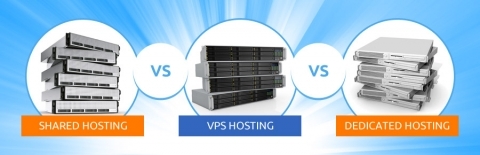
Shared hosting vs VPS hosting vs dedicated server hosting

Well, don't worry!

This blog post is here to clear away all your confusion about this issue.

Youll get to know about these three web hosting solutions in detail. This will help you choose the best hosting solution among the three.

You will learn from this blog about:

What Web Hosting Is

Types of Web Hosting

What Shared Hosting Is

Advantages of Shared Hosting

Disadvantages of Shared Hosting

What VPS Hosting Is

Advantages of VPS Hosting

Disadvantages of VPS Hosting

What Dedicated Hosting Is

Advantages of Dedicated Hosting

Disadvantages of Dedicated Hosting

Differences between Shared, VPS, and Dedicated Hosting

So, let begin!

What Is Web Hosting?

First of all, it necessary to know about web hosting, or how it works.

Your company website becomes accessible on the internet through web hosting. A website, once created, consists of lots of resources. Those resources contain lots of important data and files. HTML, CSS, and JavaScript are some examples of those files. It also comes with multimedia files like images and videos. So, you need to store those files on a server.

What is web hosting and how websites are delivered online

A robust web hosting solution gives you the technology and infrastructure. That helps you to store the files of your website. This leads to connecting your files to the internet. This simplifies accessing your website online for your users. And they can access it anywhere in the world.

Types of Web Hosting

There are six types of web hosting. They are the most popular among many users. Those types are:

  1. Shared Hosting
  2. Virtual Private Server (VPS) Hosting
  3. Dedicated Server Hosting
  4. Cloud Hosting
  5. Managed Hosting
  6. Colocation

But, as per this blog topic, well only know about shared, VPS, and dedicated hosting.

What Is Shared Hosting?

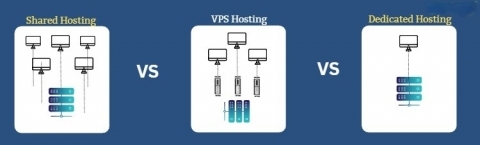
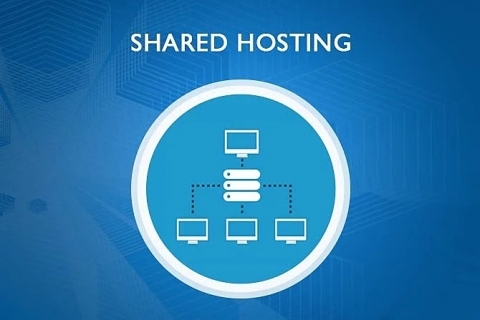
Shared hosting is a type of web hosting where you get to host several websites under a single physical server. Here, each website gets the shared resources hosted on that server. Each website gets a shared amount of the server resources. Those websites also have to run within their distributed proportion.

Shared hosting environment with multiple websites on one server

There are some key aspects of shared website hosting:

  1. Resource Sharing: This serves as an important factor in this hosting service. Every website gets to share the server resources. These important resources are CPU, RAM, disk space, and bandwidth.
  2. Several Users: It allows hosting many users and their websites on the same server. And a hosting provider manages the whole configuration.
  3. Server Management: The hosting provider manages a lot of server-related activities. They are server maintenance, security, updates, and technical support. This relieves you from dealing with server administration operations.
  4. Safer Access Control: Each user can access their files and databases only. But you cant see or access others data on the server.

Advantages of Shared Hosting

These are some of the advantages of shared hosting:

  1. Cheap in Price: Shared server hosting gives you one of the most cost-effective services. The cost of server resources gets divided among the users. This offers a perfect hosting solution for individuals and small businesses.
  2. Easy to Use: You get user-friendly control panels from most shared website hosting providers. So, if youre a beginner without advanced technical knowledge, this helps you a lot. This makes it easy for you to manage your website.
  3. Pre-installed Features: Shared web hosting gives you many important pre-installed software. They are website builders, email hosting, and content management systems. This offers you some major benefits of hosting your website.

Disadvantages of Shared Hosting

Some of the disadvantages of shared hosting are:

  1. Insufficient Resources: In shared server hosting, you share resources with many other users. This gives your hosted website limited access to CPU, RAM, and bandwidth. And this can affect performance during traffic spikes.
  2. Performance Issues: Performance impact is a huge issue in shared website hosting. An increase in traffic flow in one website in this hosting slows down the other websites. This also makes an impact on sharing resources.
  3. Security Issues: Shared web hosting causes the risk of vulnerabilities on many hosted websites. Security attacks on a website on the server can put other websites in danger.

What Is VPS Hosting?

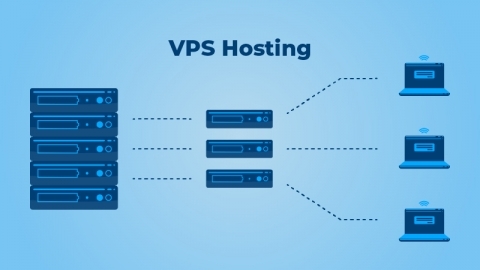
VPS means Virtual Private Server. This web hosting solution splits up a physical server into several virtual servers. Each of them operates in an independent manner. It also allocates its dedicated resources. Now, dedicated resources are not the same as the resources in dedicated hosting. You get a part of the resources from VPS web hosting. And that portion only serves as the dedicated resources for you.

VPS hosting architecture with virtualized server instances

This hosting offers you more control, flexibility, and resources than shared hosting. But you still get to share the same physical server with other VPS users.

Some of the key aspects of VPS website hosting are:

  1. Virtualization: VPS server hosting uses the virtualization technology. This is an essential factor for the function of the server. It divides a physical server into many virtual environments. And each of them works like a dedicated server.
  2. Dedicated Resources: Each VPS gives you its own dedicated part of the server resources. That means you get CPU, RAM, disk space, and bandwidth of your choice. This provides you with stable performance despite other users being on the same server.
  3. Isolation: Isolation is another important aspect of VPS website hosting. This makes each VPS separate from other virtual servers on the same physical machine. This ensures that activities in one VPS dont affect others performance or security.
  4. Control and Customization: VPS web hosting gives you root access or administrative facilities. This allows you to install custom software. You can also configure server settings by managing the management to particular needs.

Advantages of VPS Hosting

These are some of the advantages of VPS hosting:

  1. Better Performance: VPS web hosting gives you peak performance and reliability. This is because you dont have to share its resources. So, you dont have to worry during high-traffic periods.
  2. Stronger Security: The isolated space of a VPS cuts down any kinds of security breaches. So, it keeps your website secure from the other websites on the server. This makes shared web hosting a more secure hosting service.
  3. Flexible Management: You can choose between managed and unmanaged VPS server hosting. Managed VPS gives you server maintenance and support. And unmanaged VPS offers you complete control over server management.

Disadvantages of VPS Hosting

The disadvantages of VPS hosting are:

  1. Higher Price: VPS website hosting is very much expensive. The expenses are high for this hosting because of its dedicated resources and improved features.
  2. Technical Knowledge: You need technical knowledge to handle unmanaged VPS web hosting. Technical skills are important for you to understand before running this kind of hosting
  3. Maintenance Issue: Maintenance is a serious issue for unmanaged VPS server hosting. You are responsible for all server management tasks. They are time-consuming and also need specific skills.

What Is Dedicated Hosting?

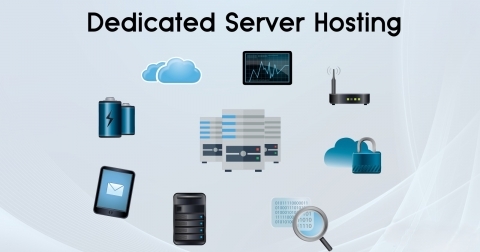
In dedicated hosting, you get an entire physical server for your sole use. You get all the essential server resources dedicated to your website. It offers the highest level of control, performance, and security among other hosting solutions.

Dedicated server hosting with isolated resources and full control

These are the key aspects of dedicated website hosting:

  1. Complete Control: You get complete root access to the server. This allows you to set up the server. You can also install custom software and manage security settings on the dedicated server.
  2. Customizable Management: You get complete customization of the dedicated server hardware and software. Dedicated web hosting helps you choose the operating system. This makes you adjust the environment for your specific needs.
  3. Scalability: You can configure and enhance your dedicated servers to suit your growing needs. You can add more storage, RAM, or processing power with this hosting.
  4. Management Options: You get dedicated server hosting either managed or unmanaged. A server provider maintains your server environment in managed dedicated hosting. You handle everything related to the server with unmanaged hosting.

Advantages of Dedicated Hosting

The advantages of dedicated hosting are:

  1. Dedicated Server Resources: You get all the server resources dedicated only to you. These resources like CPU, RAM, storage, and bandwidth are crucial. Providing those, this hosting ensures supreme performance and stability for your website.
  2. Superb Performance: Dedicated website hosting gives you a peak server performance. This is ideal for high-traffic websites and large-scale applications. It is also useful for businesses requiring constant uptime and speed.
  3. Top-notch Security: You dont have to share your server in dedicated server hosting. So, it gives you the best security protection. This hosting also gives you the option to apply custom security measures. This also provides reliability and stability to your website.

Disadvantages of Dedicated Hosting

Dedicated hosting also comes with some major disadvantages:

  1. Steep Cost: Dedicated web hosting comes off as the priciest hosting solution. Providing an entire server is its primary reason. This high cost is both for server hardware and any extra management services.
  2. Overprovisioning: Overprovisioning means paying for more resources than necessary. Dedicated server hosting can cause overprovisioning for smaller websites. This factor can also affect businesses with unstable traffic flow.
  3. Limited Scaling Flexibility: You need physical hardware upgrades to enhance dedicated servers. This turns out to be a more complex and time-consuming process. And it results in dedicated website hosting having little flexibility.

Differences between Shared, VPS, and Dedicated Hosting

There are some significant differences between shared, VPS, and dedicated hosting:

Shared vs VPS vs dedicated server hosting comparison

Point of Difference Shared Hosting VPS Hosting Dedicated Hosting
Resource Allocation

You get all the server resources shared with other users on the same server.

You get allocated server resources dedicated to you only. You get all the resources of an entire physical server without any kind of sharing.
Performance Performance fluctuates for a website if other websites use up more resources. More consistent performance because of dedicated resources. Peak levels of performance because of the entire server lease.
Control and Customization It provides you with limited control over server settings. You get much better control and customization than shared hosting. You get total control over the entire server.
Security Its shared environment causes more security risks. You get better security than shared web hosting because of the isolation of the server.

You get only the best security measures with this hosting.

Cost It is the most affordable option due to the divided costs of the server resources.

It more expensive than shared server hosting but still has economical pricing.

It the most expensive hosting solution among the three.
Scalability It offers you limited scalability due to limited shared server capacity.

You get better scalability than shared website hosting.

You can scale your resources to an extent but upgrades make physical changes to the server.
Management A hosting provider manages this hosting. It comes with both managed and unmanaged hosting but follows the characteristics of VPS hosting. It also has managed and unmanaged hosting plans but follows the attributes of dedicated hosting.
Use Cases Small websites with moderate traffic and low resource needs are the perfect fit for this hosting. It is ideal for medium-sized businesses and e-commerce websites with more resources. It is useful for large enterprise websites and high-traffic applications

Final Thoughts

Well, the differences among these three hosting solutions are in front of you.

So, it up to you to choose from these three which one suits you the best.

Hope this blog post has helped you to settle your mind with a solid decision.

But, if you take my opinion, Id suggest you choose dedicated hosting.

This hosting stands out as the best among the three. Yes, it has disadvantages, but they are very minor if you think about it.

Dedicated server hosting gives you the best hosting solution where you can control everything.

And when it comes to choosing the best dedicated hosting provider, choose Hosting Ultraso.

We provide you with the best dedicated servers at a cheap and affordable cost. You can access our hosting service from 119 data centers around the world.

Isnt that amazing?

So, choose the best in the business to be the best.

Make your business go global with our dedicated servers.

How to Login to Your Dedicated Server Easily Using SSH PuTTY

Submitted by HostingUltraso.com on

A dedicated server comes off as the most reliable server in web hosting solutions. It gives you superb performance for your company website.

Your business needs dedicated hosting for consistent uptime and higher speed.

Enterprise data center with dedicated server infrastructure

One of the best things about dedicated website hosting is that you can have remote access to it.

Remote access to your dedicated web server helps you get your data and applications from anywhere. This helps you manage your server with security and important remote work.

You can have remote access to your dedicated server hosting in so many ways. One is through your computer settings.

But you need to go through a secure login to keep your dedicated web server safe for remote access.

Here comes PuTTY, a free and open-source software that works as a terminal emulator.

PuTTY SSH client used to manage a dedicated server

PuTTY supports many different network protocols. So, this helps connect to your dedicated hosting in a very secure process.

This blog will explain how to log into your dedicated server using PuTTY with proper and useful steps.

This blog will guide you about:

What Dedicated Server Is

What Dedicated IP Address Is

What SSH Is

What PuTTY Is

Why You Need PuTTY for Dedicated Servers

Ways of Accessing Your Dedicated Server via PuTTY

Necessity of a Firewall for Your IP Address

So, let start!

What Is a Dedicated Server?

Before heading into the main discussion, it important to know a little bit about the essentials.

A dedicated server is a very popular type of web hosting service. You or your company gets an entire physical server in dedicated hosting. That means you also get all the resources of the server. With this, you also get sole access to all the server hardware. CPU, RAM, storage, and bandwidth consist of such essential hardware.

Dedicated server infrastructure explained for enterprise hosting

A dedicated web server comes with unique aspects. These special aspects make the servers different from other web hosting solutions. It gives you high performance and top-notch security. You can customize the server hardware and software settings. You can also configure your server to manage bigger workloads suiting your needs. You get to have full control over your server, too.

There also another important aspect of having a dedicated server hosting. You get the facilities of a dedicated IP address with it.

What Is a Dedicated IP Address?

A dedicated IP address performs as a static IP address. A dedicated server carries this IP address to run the website on the internet.

A dedicated web server belongs to a specific website. That website has a unique IP address that no one can share. So, a dedicated IP address holds the identity of your dedicated hosting.

Dedicated IP address used with a dedicated server environment

This address eases the server management tasks for you. It gives you direct access to the server. It improves the performance of your website with a clear flow of network traffic. It is also essential for SSL certificates. These certificates secure data between your website and users.

What Is SSH?

SSH is a secure network protocol. It helps access and manage remote computers or dedicated servers. SSH means Secure Shell. It gives you a secure channel over an unsecured network.

SSH secure shell protocol used for dedicated server remote access

It encrypts communication between the client and the server. Here, a local machine works as a client, and a remote machine as the server. So, you can remote login to a server through SSH.

What Is PuTTY?

PuTTY works as an open-source SSH client for Windows. It allows you to connect to remote dedicated servers with a secure process. You can manage remote systems like Linux and Unix servers through this software. It also supports other network protocols like Telnet, SCP, and SFTP.

But, in general, it helps to set up SSH connections. It gives you a secure channel for remote command-line access. This helps you to handle and configure your dedicated web server from anywhere.

Why Need PuTTY for Your Dedicated Server?

PuTTY is the best option to log into your dedicated server in the most secure process. These are some reasons why you need PuTTY:

  1. Using SSH: It uses SSH or Secure Shell to login to your dedicated web server. Using SSH makes remote access to the server very secure.
  2. Remote Execution: You can give commands on a remote server through PuTTY. PuTTY also works on servers supporting Unix or Linux. And you can do that from a Windows computer with ease.
  3. Easy File Transfer: You can use PuTTY as a file transfer protocol. This helps you access files and email saved on a remote server.
  4. Network Protocols: It supports different network protocols like Telnet, SCP, and rlogin, along with SSH.
  5. Secure Interface: It comes with a secure interface that provides safe data communication.

All these aspects are enough to assure you to trust logging into dedicated hosting through this. This makes it all easy to handle dedicated server hosting with a secure login.

How to Login to Your Dedicated Server with PuTTY in Easy Steps

These are the following steps to connect to your dedicated server with PuTTY.

Step 1: Download and install PuTTY.

PuTTY download page for connecting to a dedicated server

Step 2: Open the application after installation. The configuration interface looks like this “

PuTTY interface used to connect to a dedicated server via SSH

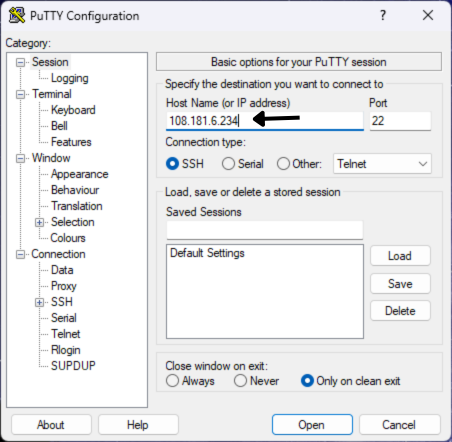
Step 3: On the right side, you will see the œHost Name option. This option asks for the IP address of the dedicated web server you want to login.

PuTTY hostname configuration screen for dedicated server login

Step 4: Below that, it gives you options for œConnection type. Here, you get different network protocols from which to choose.

PuTTY SSH connection type selection for dedicated server access

Since this blog talks about SSH, we are focusing on that only.

Step 5: Give the dedicated IP address in the œHost Name option.

PuTTY hostname and IP address field for dedicated server SSH login

In the photo above, there is an IP address (108.181.6.234) given in the box.

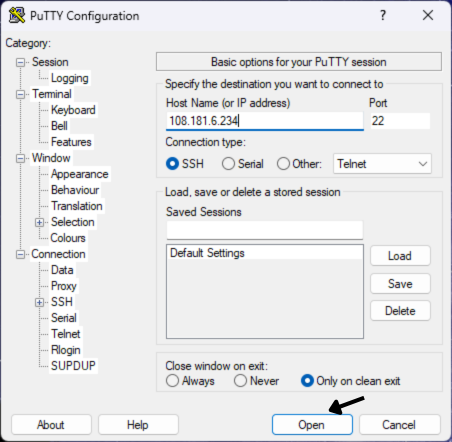
Step 6: Then, click on the œOpen button.

PuTTY configuration screen with hostname entered for dedicated server SSH

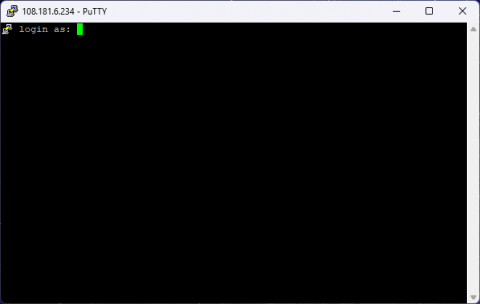
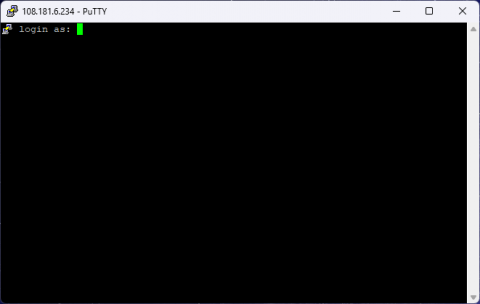
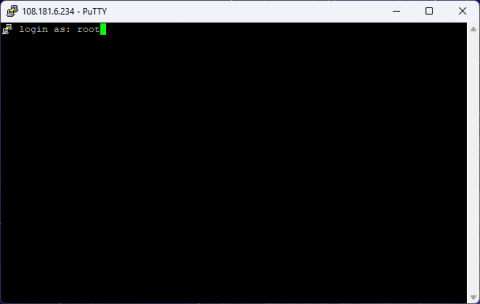
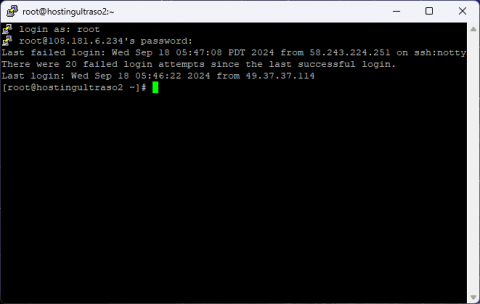
Then, it will open a command line interface (CLI) window to have further commands. The first command it will ask is œlogin as:

PuTTY command line interface connected to a dedicated server

Step 7: So, your next step will be to provide the login username by typing. Or, you can also copy the login username. Then, right-click it on the green blinking cursor. Press enter, and it will take the username at once.

PuTTY username prompt for logging into a dedicated server via SSH

Here, there is a login username, root, given as the command.

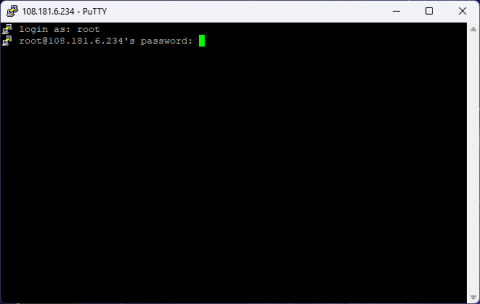
Step 8: Then, it will ask for you to provide the login username password. The command will show its syntax like this:

loginusername@IP address password:

PuTTY password prompt during dedicated server SSH login

Here, it has taken root as the login username. And, after ˜@, it has taken 108.181.6.234 as the IP address.

Step 9: You can type or copy the password in there with the same method. But it will type or paste the password invisible. It stays invisible to protect your password.

Then, it will give you access to the server with a last login history in short with day, date, time, and year. It will also provide the IP address that did the login.

PuTTY username prompt for logging into a dedicated server via SSH

Here, you can see the last login history in the "last login:" column.

Step 10: Then, it will ask for more commands. And all you have to do is to give apt commands to look into the server further.

These are the basic and most essential steps to connect to your dedicated server.

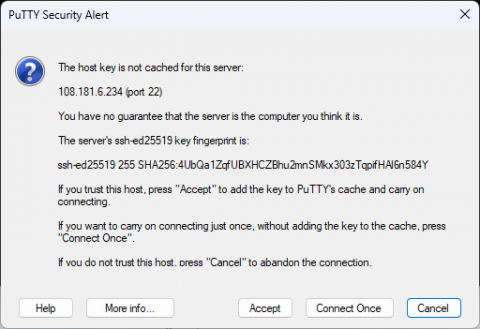
But there is also an extra step you need to follow in case of a security alert.

That security alert appears as œPuTTY Security Alert.

PuTTY security alert displaying SSH host key verification for a dedicated server

It only appears when the software doubts about the nature of the server. It comes as a concern whether the server is related to a computer.

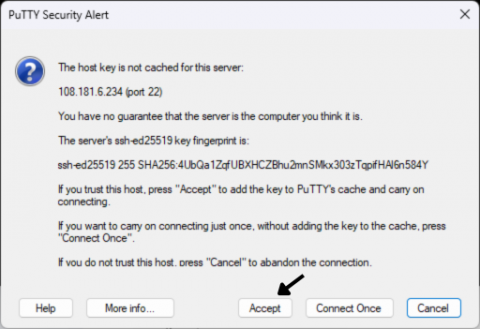
This alert asks you if you trust the host (or, the IP address). So, you have to click on the œaccept button.

PuTTY security alert showing accept button during dedicated server SSH connection

This will make PuTTY start its further operations.

Do You Need to Add Your IP Address to the Firewall?

A firewall works as a security device in your computer. It checks on and controls incoming and outgoing network traffic. And it maintains that protocol by following some predefined security rules. It acts as a wall between a trusted internal network and untrusted external networks. This is how it blocks dangerous traffic and illegal access.

So, sometimes, your computer firewall might block access to your IP address.

IP address firewall access control for securing a dedicated server

This happens when it assumes your dedicated IP address as an untrusted external network.

So, that means the firewall has blacklisted the IP address youre trying to use.

If this issue happens, only then you have to add your IP address to the firewall. This will make your login to the dedicated server possible with PuTTY.

Otherwise, youre all good to go.

N.B. Firewall blocking the IP address has no relation with the PuTTY security alert.

Final Thoughts

Logging into your dedicated server from anywhere gets easy with PuTTY.

Also, the steps of logging into your dedicated web server with PuTTY are easy.

Connecting to your dedicated server hosting through PuTTY saves you a lot of time. You get to know the status, collect data, and access information about your server at once.

I hope this blog has given you a clear idea of how to make a secure login through SSH.

PuTTY offers you the best and easiest solution for remote accessing your dedicated hosting.

RAID Levels Explained: Simplifying Your Data Storage Choices

Submitted by HostingUltraso.com on

RAID levels carry the identity of the RAID system.

RAID is essential to improve your dedicated server storage system. You need a dedicated server to build your company website.

Your website needs to have different resources. The most important of those resources are various multimedia files. These files contain images and videos, in general.

It also can have other important resources in different file types. Those important files are CSS, HTML, and JavaScript. Server storage helps your website have all those resources.

Now, dedicated server storage is also essential for keeping your data safe and secure.

A website is nothing without its data. Your website gets a distinct identity through its data. The dedicated server storage helps you save, manage, and recover important website data. So, your website dedicated server needs an ideal storage capacity.

Your website data, system files, and applications stay safe and secure in the storage space. Still, you might face the risk of potential data loss due to many technical reasons. RAID helps you to stay worry-free from such issues in dedicated server storage.
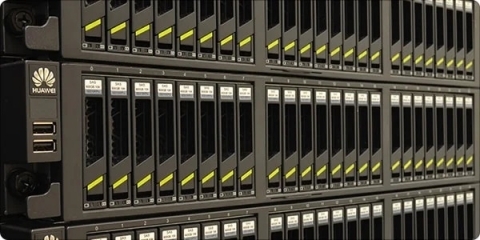
Enterprise RAID hard drive array installed in a dedicated server casing

Different RAID types strengthen the utility of the RAID system. RAID hard drives in a dedicated server function through these levels. They increase performance with the redundancy aspect of this technology.

You will learn everything about RAID array levels in this blog post.

This will help you to choose the best RAID level for your dedicated server storage.

In this blog, you will learn about:

What RAID Is

What RAID Levels Are

Types of RAID Levels

Detailed Overview of RAID 0

Detailed Overview of RAID 1

Detailed Overview of RAID 5

Detailed Overview of RAID 6

Detailed Overview of RAID 10

Detailed Overview of RAID 2, 3, 4

Detailed Overview of RAID 30

Detailed Overview of RAID 50, 60

RAID Levels and Their Advantages

RAID Levels and Their Disadvantages

So, let jump straight to it!

What Is RAID?

Before knowing about RAID levels, you should know a little more about its system.

RAID stands for Redundant Array of Independent Disks. This technological system takes many physical hard drives in a single logical unit. This improves reliability in the data storage. This also optimizes performance and capacity in computer systems.

This also benefits the dedicated server systems more. You can set RAID arrays to circulate data across many disks. This helps enhance different aspects of the dedicated server storage.
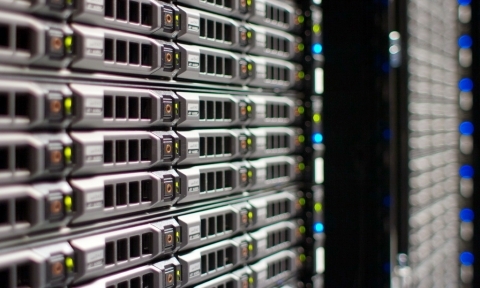
Enterprise RAID disk array installed in a dedicated server rack

It copies your data from one hard drive to store it in another. So, it also gives you data protection facilities.

But that doesnt make it some kind of backup technology.

It upgrades the server storage with incredible functions. And RAID array levels help your dedicated server storage perform better.

What Are RAID Levels?

RAID levels are different but important structures in a RAID system. They build the behavior and qualities of a RAID storage system in dedicated hosting. These levels arrange and manage many physical disks in the system.

Each of these levels comes with a unique method of combining the disks. This helps the disks meet various purposes of storage space. This improves data redundancy and storage performance. It also increases the storage capacity, strengthening the utilities of RAID.

RAID array levels in storage work through some important functions. They distribute data across the disks for better management. They also check on the system in a dedicated server to manage disk failures. They also make redundancy happen in the system.
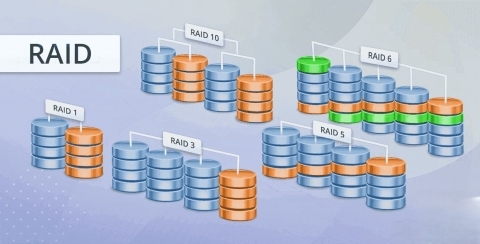
Comparison of RAID levels used in dedicated server storage environments

The levels also decide how the RAID system will perform in various operations. They check out on read and write operations. They look for the array working on the total usable storage space. They also ensure a strong dedicated server storage system against hardware failures.

RAID levels in storage are vital to understand how RAID arrays work. Each level comes with balancing among different RAID system functions. Those are performance, storage efficiency, and data protection. These levels provide a structure to select a suitable setup.

These setups depend on the particular needs and priorities of a system. Those needs and priorities range from data protection to fast access times. They also focus on the most effective use of accessible storage resources.

Types of RAID Levels

There are three types of RAID levels: 1) Common, 2) Rare, and 3) Advanced.

RAID 0, 1, 5, 6, and 10 (1+0) fall under the first type of RAID.

Rare RAID levels are RAID 2, 3, and 4.

Advanced RAID levels are RAID 30 (3+0), 50 (5+0), and 60 (6+0).

A Detailed Overview of RAID 0

Functions: In RAID levels, RAID 0 works through striping. This level works by dividing data into blocks. It writes the data across many disks in parallel. It then shares these blocks across many disks in a serial manner.

A typical stripe size, which is the size of each block, ranges from 16 KB to 128 KB. It can also take up more size depending on the workload.
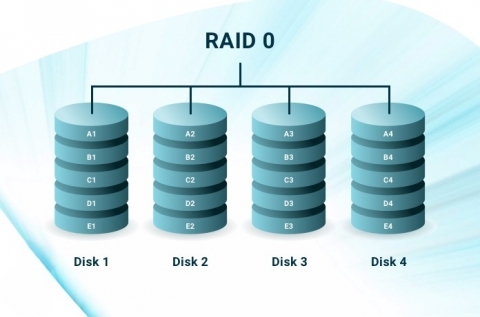
RAID 0 disk striping configuration for performance on a dedicated server

Data distribution across many disks makes accessing data easier. The system can get different parts of data at once from several disks. This also increases the total data throughput in a dedicated server system. This is because data read or write from a lot of disks happens at the same time.

Use Case: It is perfect for applications running on dedicated servers that need high speed. Video editing applications are one such example. But it doesnt provide any critical data protection facilities.

A Detailed Overview of RAID 1

Functions: RAID 1 is an essential RAID level known for the mirroring function. In this setup, the same data gets copied to two or more disks at the same time. Mirroring is also another name for this act of copying. It takes every piece of data stored on the dedicated server written to the array. It then duplicates them to store on two or more disks. So, each disk in the RAID 1 array has the same copy of the data.

It also provides the best read and write speeds for data in the dedicated servers. The system can get the data from any disk with the read operations. Having identical data makes accessing data from any disk easier for the system. The system also writes the data to all disks in this RAID array at once. Each disk gets the same data at the same time. This ensures that all disks stay identical.
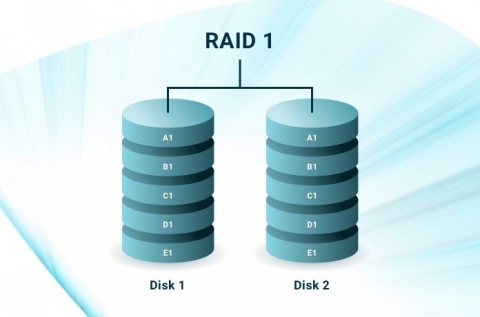
RAID 1 disk mirroring configuration on a dedicated server

This RAID array level also offers peak fault tolerance due to mirroring. So, in case of disk failure, the system runs using the data in the other disks. This doesnt cause any interruption to the process in dedicated servers.

Use Case: RAID 1 is perfect for applications where data redundancy is important. Financial data storage is an example of that. This RAID level in storage is also useful for database dedicated servers.

A Detailed Overview of RAID 5

Functions: RAID 5 divides the data into blocks, and then stripes that across all disks in the array. It integrates parity information along with the data blocks. So, the main function of this RAID level is striping with parity.

Parity is a type of data that checks for errors. It rebuilds the original data in case of disk failure in dedicated servers. It doesnt store data on a single disk. It distributes data across all the disks in the array.
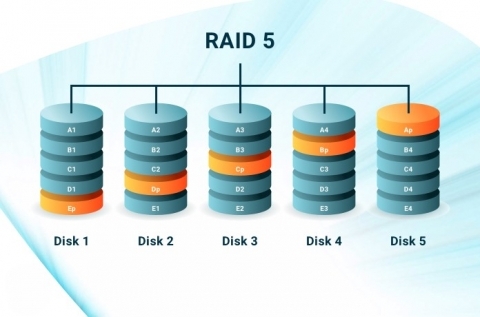
RAID 5 disk configuration with distributed parity on a dedicated server

The system calculates the parity while writing the data in a RAID 5 array. It takes all the data in the other blocks. Then, it stores the data in a specific location on a different disk from the data itself. The write process includes writing both the data and parallel parity blocks to the disks. The system can also access the data from the contained disks in dedicated servers. Due to striping, its system can read data from several disks at the same time. It only reads the parity data when a disk fails. This improves read performance, in general.

Use Case: This array is useful for file servers. Other applications that need a mix of redundancy and performance also use this array.

A Detailed Overview of RAID 6

Functions: This RAID level works data striping with dual parity. In striping, it divides and stripes the data across several disks. But it takes two independent parity blocks (P and Q) per stripe. It calculates both parity blocks using different algorithms. This makes the dedicated server system recover data in case of multi-disk failure. It also distributes dual parity across all disks in the array.
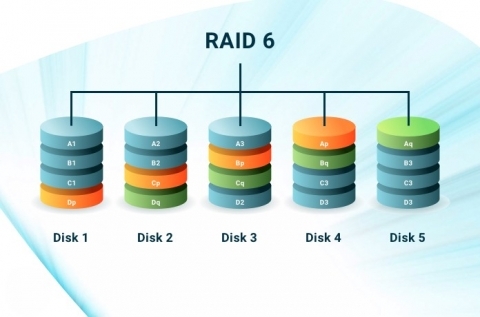
RAID 6 disk layout with dual parity for fault tolerance on a dedicated server

The data write process also follows the dual parity information. It calculates the P parity set like in RAID 5. But it takes a different mathematical formula to build the Q parity set. Both parity blocks get updated upon writing the new data. The read process follows the same method as RAID 5.

Use Case: This RAID is useful for dedicated servers where data protection is a priority. The systems dealing with the concern of various disk failures need the help of this array, too.

A Detailed Overview of RAID 10

Functions: RAID 1 and 0 make RAID 10 with their combining functions. So, it combines both striping and mirroring. It mirrors two RAID 0 arrays to run its operations.
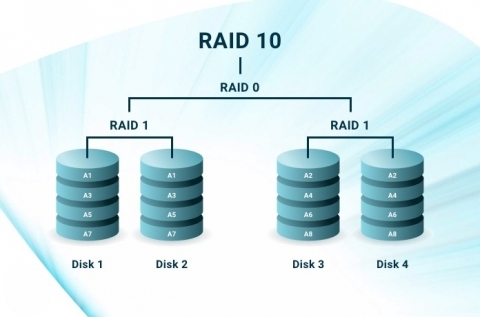
RAID 10 configuration combining mirroring and striping on a dedicated server

Use Case: It is ideal for high-performance databases that need both speed and redundancy.

A Detailed Overview of RAID 2, 3, and 4

Functions: These RAID levels are less common to use.
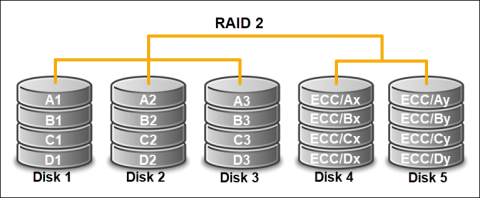
RAID 2 disk configuration using error correction codes on a dedicated server

RAID 2 uses bit-level striping with Hamming code error correction. RAID 3 performs byte-level striping with dedicated parity. RAID 4 applies block-level striping with dedicated parity.
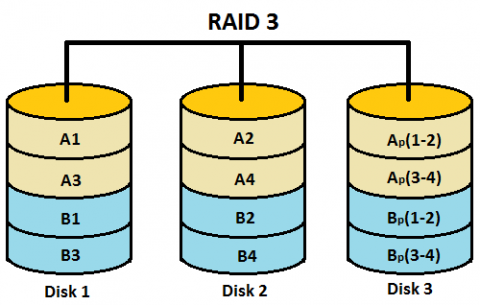
RAID 3 disk layout with byte-level striping and parity on a dedicated server

Use Case: The usage of these RAID array levels is very rare nowadays.
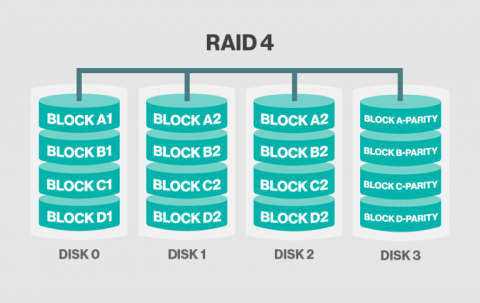
RAID 4 disk configuration showing dedicated parity disk on a dedicated server

A Detailed Overview of RAID 30

Functions: This RAID level takes many RAID 3 arrays and stripes data across them. This provides striping for performance. It also delivers dedicated parity of RAID 3 for redundancy.
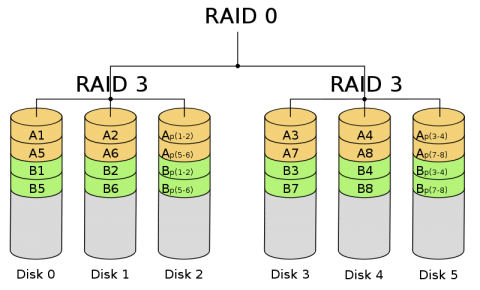
RAID 30 configuration combining RAID 0 and RAID 3 on a dedicated server

Use Case: It is important for applications that need high-speed sequential data processing with redundancy. Video editing or large-scale media production are some examples.

A Detailed Overview of RAID 50 and 60

The functions of both of these RAID levels are alike in RAID 30.
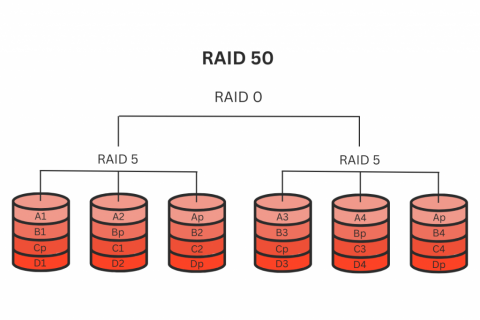
RAID 50 disk layout combining RAID 0 and RAID 5 on a dedicated server

But they have different use cases.

RAID 60 configuration combining RAID 0 and RAID 6 on a dedicated server

Use Case: RAID 50 is ideal for large-scale storage systems that run on high performance and fault tolerance. And RAID 60 is crucial for applications requiring peak redundancy and high availability. Both these different RAID types help make enterprise-level applications.

Advantages of Raid Levels

Here are the advantages of all the RAID levels:

RAID Levels Advantages
RAID 0

It provides high performance in dedicated servers with full storage capacity.

The data read and write operation happens at the same time across several disks.

It comes with a very easy and simple setup compared to other RAID array levels.

RAID 1

It gives you peak data redundancy through mirroring.

It also simplifies the data recovery process if one disk fails in dedicated servers.

The mirrored disks in this RAID hard drive increase system reliability in general.

RAID 5

Fault tolerance in the RAID 5 array distributes parity data. This helps restore lost data in case of a single disk failure in dedicated servers.

It offers better storage performance than RAID 1. It only takes the space of one disk for parity.

Also, its data redundancy option comes with an affordable cost.

RAID 6

Its dual parity provides an improved and higher fault tolerance.

Its continued operation during disk failures provides higher data availability.

It also cuts down the risk of downtime in dedicated servers.

RAID 10

It provides high performance and redundancy in dedicated servers.

It also can endure the failure of one disk in each mirrored pair.

RAID 2, 3, 4

These levels have very limited advantages. RAID 5 and 6 have taken the places of these levels.

RAID 30

It offers high throughput for huge sequential data transfers.

It can also tolerate several disk failures in dedicated servers.

RAID 50, 60 The advantages of these RAID levels are as same as RAID 30.

Disadvantages of Raid Levels

These are the disadvantages of all the RAID levels:

RAID Levels Disadvantages
RAID 0

It doesnt have any options for data redundancy in case of a single disk failure in the array.

It also leads to the possibility of significant data loss in the dedicated servers.

It doesnt have any basic mechanisms for error detection or correction.

RAID 1

Mirroring in this RAID leaves only half of the storage space usable.

Storage space increases hardware expenses to manage large data in dedicated servers.

This also hampers data write performance compared to other types of RAID.

RAID 5

Despite good read performance, it provides a slower data write performance.

If a disk fails, rebuilding the array takes much time. Also, this array has a limited fault tolerance.

It leads to crucial data loss in dedicated servers if a disk fails during the rebuilding process.

RAID 6

RAID 6 needs more complex parity calculations than RAID 5 due to dual parity.

It leads to a much slower write performance. It also needs more disk capacity for parity.

This reduces the usable storage space in dedicated servers.

RAID 10 It needs twice the number of disks for mirroring. So, it is very expensive.
RAID 2, 3, 4

These types of RAID are outdated for dedicated servers.

RAID 2 is inefficient, and RAID 3 and 4 provide less flexibility.

RAID 30

The dedicated parity disks can serve as bottlenecks during write operations.

This RAID array level needs a vast number of disks. That makes it very complex and expensive to use.

RAID 50, 60 The disadvantages of these RAID levels are as same as RAID 30.

Final Thoughts

RAID array levels in the data storage make your dedicated hosting better.

The best kind of RAID storage for your dedicated server choices lies in the best kind of RAID levels.

So, choosing the data storage depends on your decision only.

I hope this blog post has helped you by giving you a clear idea of the best kind of RAID hard drive.

And you get the best RAID with better dedicated hosting from Hosting Ultraso.

Our company is a well-known name in providing the best dedicated hosting. And we boast of having 119 data centers worldwide.

Get the best RAID storage with the best dedicated server provider. Make your business global.
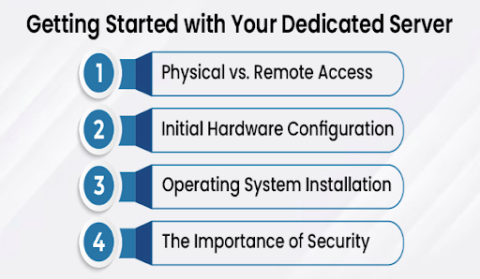
Software Vs. Hardware RAID: A Precise Comparative Analysis

Submitted by HostingUltraso.com on

RAID system plays an important role in dedicated server management.

You need to host your company website on a dedicated server. They keep your resources like different multimedia files. Images and videos consist of such multimedia files. Other than that, you can also store different files like HTML, CSS, and JavaScript. These important resources build your website with the help of server storage.

Data is everything on a website. It gives your website a unique identity. You can save, manage, and retrieve data through the server storage space. So, storage capacity is essential for a dedicated hosting server. It keeps your website's data, applications, and system files stored safe and secure.

So, losing your data can cost you a lot. And you dont want that to happen to your website, do you?

RAID array is here to help you.

Enterprise RAID storage system installed in a dedicated server rack

A software or a hardware RAID boosts the performance of your dedicated server storage.

This blog gives you a general introduction to the RAID system. Then, itll give you every detail on software and hardware RAID.

In the end, youll know more about them with a comparative analysis.

This blog will give you a clear idea of what type of RAID storage to choose. So, you will have no more confusion about it.

In this blog, you will know about:

What RAID Is

Primary Aspects of RAID

What Software RAID Is

Advantages of Software RAID

Disadvantages of Software RAID

What Hardware RAID Is

Advantages of Hardware RAID

Disadvantages of Hardware RAID

Comparison between Software and Hardware RAID

Without further ado, let jump in!

A General Introduction to RAID System

Before getting into a detailed discussion, it important to know what a RAID system is. Or how it works, at first.

RAID means Redundant Array of Independent Disks. It is a storage technology that enhances the efficiency of storage systems.

This combines many hard drives into a single logical unit to store data. Through that function, it brings reliability to disk array systems. It makes your data storage work faster with more security. This helps improve data redundancy and increase the performance of the data storage. But these two aspects sometimes depend on the RAID level of your choice.

Hot-swap RAID drive bays in a dedicated server chassis

It serves as an important factor in data protection, too. It copies data from one hard drive to another.

But that doesnt mean that it serves as some backup technology.

Still, it boosts the dedicated server storage with its amazing utilities and functions.

Basic Functions of RAID System

This technology works through some basic yet essential functions:

  1. Striping: This divides data across several disks to improve read and write speeds.

    RAID striping showing data blocks distributed across disks in a dedicated server

  2. Mirroring: It copies data across two or more disks for better data protection.

    RAID mirroring showing identical data blocks across disks in a dedicated server

  3. Striping with Parity: Parity restores data in case of drive failure or loss. This function helps data and parity information stripe across three or more disks.
  4. Striping with Double Parity: This function is the same as striping with parity, but it takes an extra layer of parity. It provides the drive with much better protection from data loss.
  5. Mirroring and Striping: It mirrors the data and then stripes it on, at least, four disks. This brings redundancy and performance in the storage.

Basic RAID Levels

Basic levels of the RAID system carry out these functions. There are some common RAID levels. They are RAID 0, 1, 5, 6, and 10 (1+0).

RAID levels and data distribution techniques for dedicated server storage

These levels provide different types of configurations in the RAID data storage. But they have a huge impact on the basic aspects of RAID.

Primary Aspects of RAID System

RAID hard drive works through some primary aspects:

  1. Redundancy: This feature duplicates data across several disks. This ensures data integrity in your dedicated server storage. It also makes your data available in case there is a disk failure. Mirroring or parity makes this happen.
  2. Performance: RAID array also distributes data across several disks. This helps improve data read or write speeds in the storage. It happens due to striping and the combined functions of mirroring and striping.
  3. Capacity: You also can have total storage available in the RAID system. But this depends on the RAID levels. The storage capacity varies in different levels. RAID 0 gives you the highest storage capacity. But RAID 1 provides half of the total disk.
  4. Fault Tolerance: This feature makes the RAID storage system continue working despite a disk failure. Different RAID levels provide various degrees of fault tolerance. Redundancy and parity operate to make it work. It becomes important for critical dedicated hosting solutions.
  5. Data Protection: It also protects your data from corruption or loss. It ensures that your data is safe from the terrible effects of a disk failure. Redundancy with mirroring or parity keeps your data secure.
  6. Hot Swapping: This replaces a failed disk in your storage without the full system shutdown. This feature is available in many RAID controllers. This is crucial to maintain uptime and data availability in dedicated servers.
  7. Rebuilding Process: This refers to the time of restoring the array to the state of full redundancy. This happens after a disk failure and replacement, in general. RAID levels with huge capacity take longer rebuild times. Faster rebuild times cut down the risk of data loss.
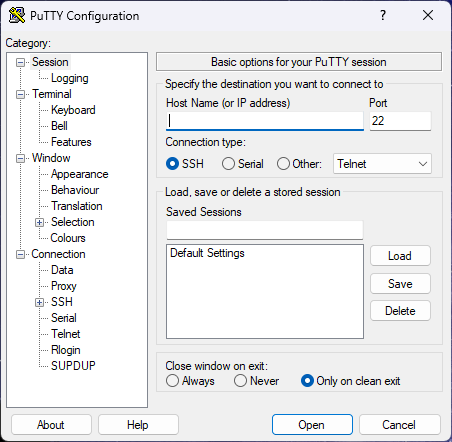
What Is Software RAID?

Software RAID means the implementation of RAID technology through software. The software runs on the host operating system (OS) of a dedicated server, in this case. It operates on the system CPU and memory resources. This is how it manages the system with data striping, mirroring, and parity.

Software RAID architecture managed by operating system on a dedicated server

This setup combines many physical disks to make an array. It takes the help of different OS utilities or third-party software to configure. This allows creating, managing, and monitoring the RAID system. And it doesnt take help from any specialized hardware RAID controllers.

Advantages of Software RAID

These are some of the major advantages of software RAID:

  1. No Hardware Dependency: A particular operating system controls running this technology. So, it doesnt depend on any specific hardware elements. It makes moving the RAID array to another machine easier in case of server or system failure.
  2. OS Integration: This facility makes basic OS maintenance processes in a dedicated server more seamless. It also allows for more consistent updates, patches, and support.
  3. Easy Recovery: In case of system failure, you can recover data by relocating the disks to another dedicated server. This feature makes your data recovery woes vanish.
  4. Monitoring Tools: Many software RAID solutions offer you powerful monitoring tools. This allows you to check on the RAID status. It also makes maintenance tasks easy to handle.

Disadvantages of Software RAID

It also comes with some crucial disadvantages:

  1. Lack of Hardware Support: This doesnt have the major benefits of hardware features, like battery-backed cache. That feature helps in stopping data loss during power failures in a dedicated server. This makes this RAID data storage less reliable in critical situations like this.
  2. Limited RAID Levels: This RAID system only supports basic RAID levels like RAID 0, 1, and 5. So, it gives you fewer advanced RAID arrays with limited efficiency.
  3. Limited Hot Swapping and Hot Spares: It doesnt have a strong hot swapping feature like in hardware RAID. It is less seamless and secure which results in its lower efficiency.

What Is Hardware RAID?

Hardware RAID works through integrated RAID controllers on a dedicated server's motherboard. Those controllers manage the RAID system being independent from the host operating system. They also manage tasks like data striping, mirroring, and parity calculations.

Hardware RAID architecture showing RAID controller and disks in a dedicated server

The RAID controller has its own processor, memory, and firmware. This helps offload RAID management tasks from the host system. This also provides a more structured and independent solution. And it helps manage several disk drives in a RAID setup with that solution.

Advantages of Hardware RAID

Hardware RAID gives you these advantages:

  1. Reliability: Some hardware RAID controllers come with a battery-backed or non-volatile cache. This prevents data loss in the cache in case of power failure. The controllers also come with advanced error detection and correction systems. This enhances data integrity and lowers the risks of data corruption.
  2. Hot Swapping and Hot Spares: It also supports hot swapping. This facility replaces failed drives without a full system shutdown. It also gives you the facility of hot spares. These are standby drives that take the place of a failed drive. This cuts down the downtime and improves fault tolerance.
  3. Advanced RAID Levels: Hardware RAID controllers give you more complex RAID levels. Those levels are RAID 6, 10, and more. This gives you more options for higher redundancy and performance in the dedicated servers.
  4. Improved Data Security: Some hardware RAID controllers offer you hardware-based encryption support. This gives an added layer of data security. This also doesnt affect the performance of the system at all.
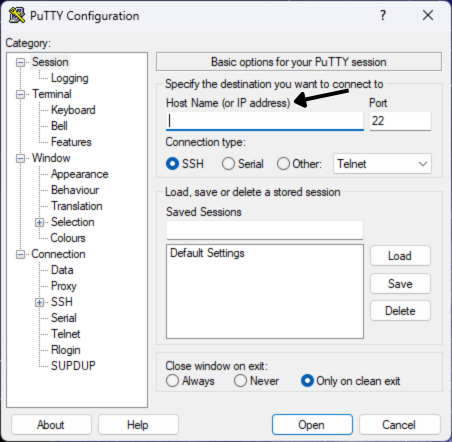
Disadvantages of Hardware RAID

It comes with some of these disadvantages:

  1. Potential for Single Point of Failure: The RAID controller can be the very reason for a single point of failure. The entire RAID system may be in danger if it malfunctions. It might become unavailable even if the drives are still working. Having redundant controllers can reduce the risk. But that is a complex process, and pricey to handle.
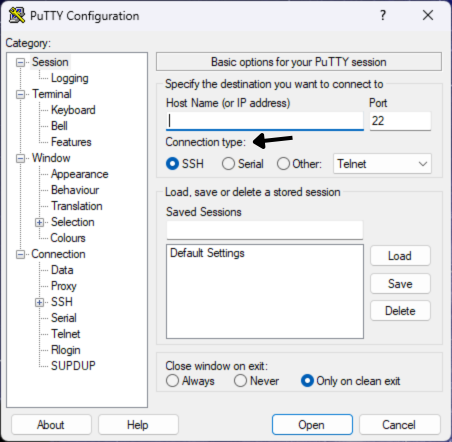
  2. Recovery Challenges: Data recovery in failed hardware RAID settings is more complex and expensive. The same or a compatible RAID controller can fix that. But that also a very high-cost affair. Complex portability options also make matters worse for data recovery in this case.
  3. Physical Space: It takes up more physical space within the dedicated servers. This creates problems for expanding storage capacity in a confined space.

Differences between Software and Hardware RAID

Software RAID vs hardware RAID comparison for dedicated server storage

There are some major differences between these two types of RAID in dedicated servers:

Points of Difference Software RAID Hardware RAID
Implementation A host operating system with software resources manages this RAID. A dedicated RAID controller card on the motherboard manages this RAID.
Performance It uses the host system CPU and memory for its operations. It uses an integrated processor and memory on the RAID controller.
Cost It more cost-effective. It very expensive.
Ease of Setup and Management It easy to set up. It has a very complex setup.
Scalability and Flexibility It easier to adjust and expand. It has limited flexibility due to the need for specific RAID controllers.
Performance Impact at the Time of Rebuilds Rebuild operations have a significant impact on system performance. Rebuild operations have the lowest impact on system performance.
Fault Tolerance and Recovery These depend on the capability of the OS. It offers a stronger fault tolerance and faster recovery.
Compatibility It more compatible with different systems and platforms. It deals with significant compatibility issues with different systems and platforms.
Bootability It doesnt have booting support in the RAID array. It has bootable RAID arrays.

Final Thoughts

There are pros and cons in both software and hardware RAID. But both of them perform the essential functions of RAID in their own way.

So, to choose between one of them is really up to you.

RAID boosts your businesses of any shapes and sizes. It strengthens dedicated server performance in a significant manner.

I hope this blog has helped you to make a steady decision from your side.

Also, worth noting¦

We, at Hosting Ultraso, provide dedicated hosting all around the world.

You get the best facilities of 119 data centers worldwide.

And dedicated hosting gets better with RAID storage.

Get the server solution from us with the best RAID system. Choose us as the best dedicated server provider. Broaden your business around the world.